Elegant Floral Tree Silhouettes Set: A Guide to High-Quality Vector Art for Designers and Crafters
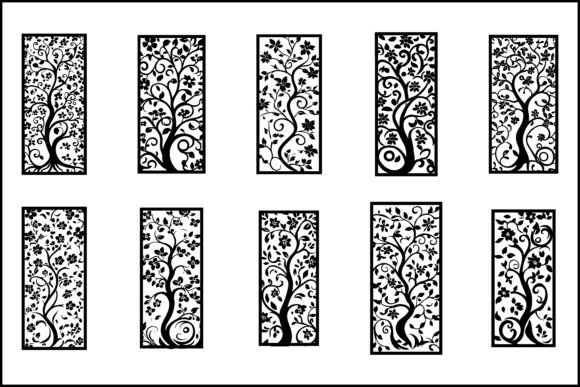
In the world of digital design and physical crafting, the difference between a professional finish and an amateur result often comes down to the quality of your source files. The Elegant Floral Tree Silhouettes Set represents a convergence of vintage botanical aesthetics and modern technical precision. These illustrations are not merely decorative images; they are functional assets designed for versatility. Whether you are creating intricate laser-cut wall art, designing custom wedding invitations, or developing unique tattoo stencils, understanding how to properly utilize these files is essential.
Many creators rush into purchasing or downloading silhouette packs without fully evaluating the file formats or the intricacy of the designs. This oversight can lead to significant frustration during the production phase. By understanding the specific capabilities of this collection—available in PNG, EPS, and JPG high-quality formats—you can avoid common pitfalls and ensure your final product meets professional standards.
Understanding the Value of Vector vs. Raster Formats
One of the most frequent mistakes beginners make is ignoring the distinction between vector and raster files. The Elegant Floral Tree Silhouettes Set includes both, but using them interchangeably without understanding their properties is a recipe for poor results.
The EPS (Encapsulated PostScript) files included in this set are vectors. This means they are composed of mathematical paths rather than pixels. For professionals using software like Adobe Illustrator, CorelDRAW, or Inkscape, these files are indispensable. They allow you to scale the floral tree art to any size—from a small jewelry pendant to a large-scale mural—without losing a single detail of the intricate design. If you attempt to enlarge a low-resolution JPG for a large print, you will encounter pixelation, resulting in jagged edges that ruin the vintage floral aesthetic.
Conversely, the PNG and JPG files are raster images. While the provided files are high quality, they have fixed dimensions. These are best suited for digital applications, such as web graphics, social media posts, or quick mockups. A common error is trying to use a PNG for laser cutting. Most laser cutting software requires vector paths to guide the beam. Using a raster image forces the software to "trace" the image, which often results in inaccurate cuts, especially with the swirling branches and delicate floral patterns found in this collection. Always prioritize the EPS file for physical fabrication.
Navigating Complexity in Laser Cutting and Stenciling
The allure of the Elegant Floral Tree Silhouettes Set lies in its detailed, ornamental nature. However, this complexity presents a challenge for those new to laser cutting or stencil creation. The woodcut style and engraving-like details are visually stunning on screen, but they can be structurally fragile when cut from physical materials.
A critical mistake is selecting a design that is too intricate for the chosen material. For example, if you are cutting these silhouettes from thin paper or cardstock for a floral wallpaper effect, the fine connections between the botanical elements may tear easily. Similarly, when working with wood or acrylic, overly thin lines can burn through or break off during handling.
To avoid this, always preview the tree silhouette art at 100% zoom before sending it to your cutter. Look for "floating" elements—parts of the design that are not connected to the main trunk or border. In stencil work, these islands need to be anchored or removed. A better approach is to simplify the design slightly for robust materials or choose thicker substrates that can support the detailed pattern. Test cuts on scrap material are non-negotiable when working with such intricate silhouettes.
Ensuring Visual Impact in Digital and Print Media
For graphic designers and marketers, the Elegant Floral Tree Silhouettes Set offers a sophisticated black and white contrast that works well in minimalist branding. However, a common oversight is failing to adjust the background transparency correctly. The PNG files provided are high quality and typically include transparent backgrounds, which is crucial for layering.
If you place a decorative tree over a busy background without proper blending modes or opacity adjustments, the floral ornament details can get lost. The symmetrical and abstract tree designs rely on negative space to define their shape. When using these in modern design projects, ensure there is sufficient contrast between the silhouette and the background color. Using a solid, light background often highlights the floral engraving style more effectively than a textured one.
Additionally, consider the context of the nature-inspired imagery. These trees evoke a sense of vintage elegance and folk art. They are particularly effective for brands focused on wellness, organic products, or artisanal goods. Misaligning the aesthetic—for instance, using these ornate, classical designs for a hyper-tech startup—can create visual dissonance. Match the artistic tree style to the brand voice to maintain coherence.
Key Considerations Before Downloading or Purchasing
Before integrating the Elegant Floral Tree Silhouettes Set into your workflow, take a moment to evaluate your specific needs. Here is a checklist to ensure you make the right choice:
- Check File Compatibility: Ensure your software can open EPS files if you plan to edit the vectors. If you only have basic image editors, stick to the high-resolution PNGs.
- Assess Detail Level: Look closely at the floral elements and swirling branches. Are they fine enough for your intended output? For small items like earrings, you may need to simplify the path.
- Verify Licensing: Always read the license agreement. Determine if the usage is for personal projects, commercial products, or client work. This prevents legal issues down the line.
- Test Print Quality: If using JPG or PNG for print, verify the DPI (dots per inch). High-quality prints require at least 300 DPI. The provided files should meet this, but always double-check.
By paying attention to these details, you transform a simple download into a powerful design asset. The Elegant Floral Tree Silhouettes Set is more than just clip art; it is a toolkit for creating elegant, nature-loving designs that resonate with audiences. Whether you are a crafter making handmade gifts or a designer building a brand identity, respecting the technical nuances of these files ensures your creativity shines through without technical hindrances.
Ultimately, the goal is to let the botanical beauty of the floral tree speak for itself. With the right preparation and understanding of formats, you can leverage these decorative silhouettes to produce work that is both visually striking and professionally executed. Avoid the shortcut of ignoring file types, and you will find that these vintage-inspired assets become a staple in your creative library.